Hale & Co product · Reading workbook
Reading Library & Book Club Tracker
Short answer: A $7 recordkeeping workbook (regularly $9; Black Friday price through 1 Dec 2026) for your shelf and your club. Track format, library due dates, series, a yearly goal you set, and book-club meetings — in Excel 2016+ or Google Sheets. Optional Goodreads export paste.
Questions this page answers: “book club tracker template” and “spreadsheet to track books, library due dates, and a yearly reading goal.” A reading tracker should hold a whole shelf without a new file each January, and it should not need a 30-tab cockpit.
Disclosure: this is a Hale & Co product. If you buy through the link on this page, we earn the sale. Facts about third-party tools on this site are still sourced from those vendors' official pages. How we make money.
Buy for $7 on Gumroad Questions? Email us
What you get
- Two .xlsx workbooks that open in Microsoft Excel 2016 or later (Windows or Mac) and in Google Sheets (File > Import, then File > Make a copy). No VBA, no scripts, and no Microsoft 365 requirement.
- An EXAMPLE file with sample titles already filled in (public-domain and fictional books), and a BLANK file for your own shelf.
- Six tabs: Start Here, Library, Series, Book Club, Dashboard, and Goodreads Paste.
- Room for 1,000 books on the Library, 1,000 rows on the paste tab, 80 series, and 200 book-club meeting rows.
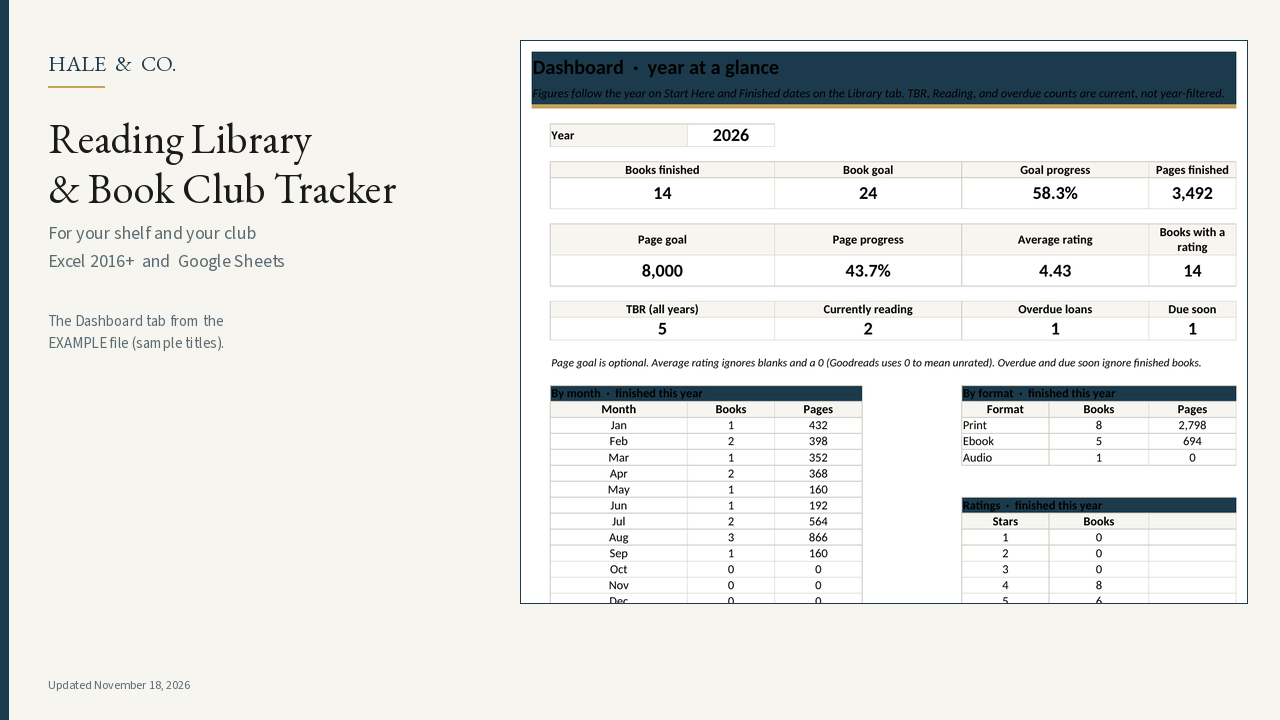
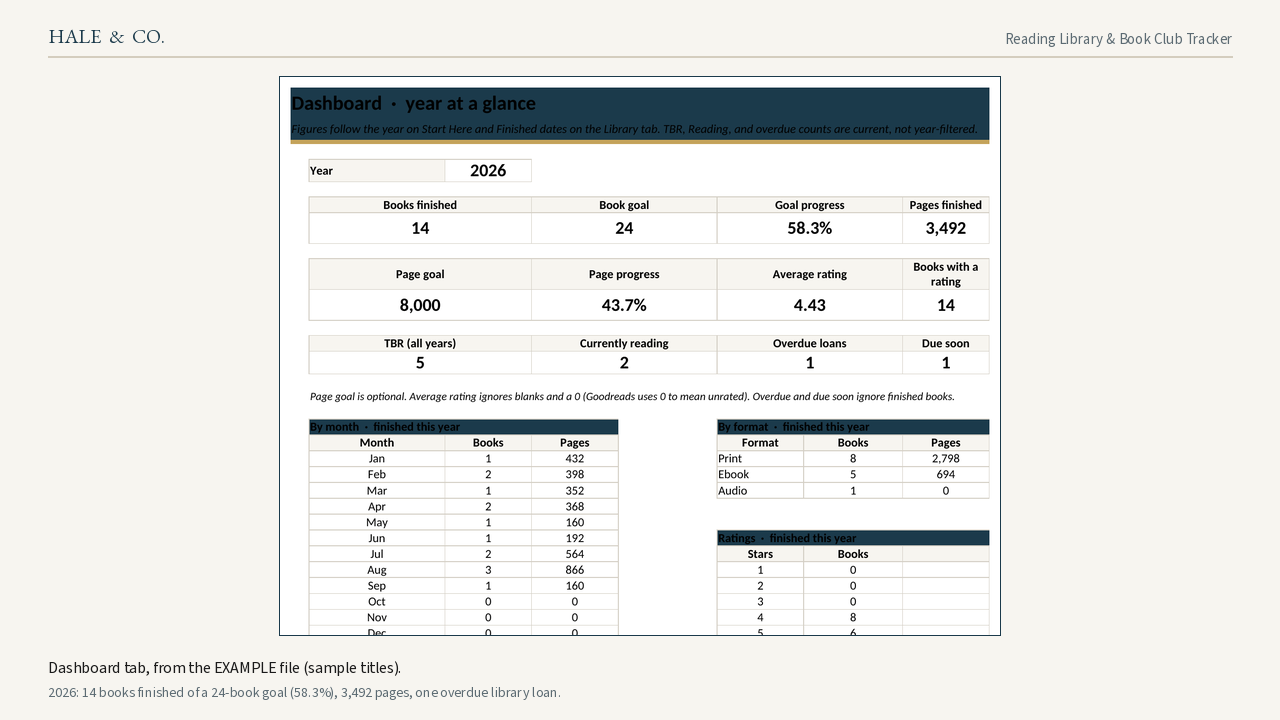
- The Dashboard screenshot on this page is from the EXAMPLE file (sample titles). For 2026 it shows 14 books finished against a goal of 24 (58.3%), 3,492 pages, and one overdue library loan.
How it works
- Set the year, a book goal, and an optional page goal once. The year is a setting, not baked into the file name.
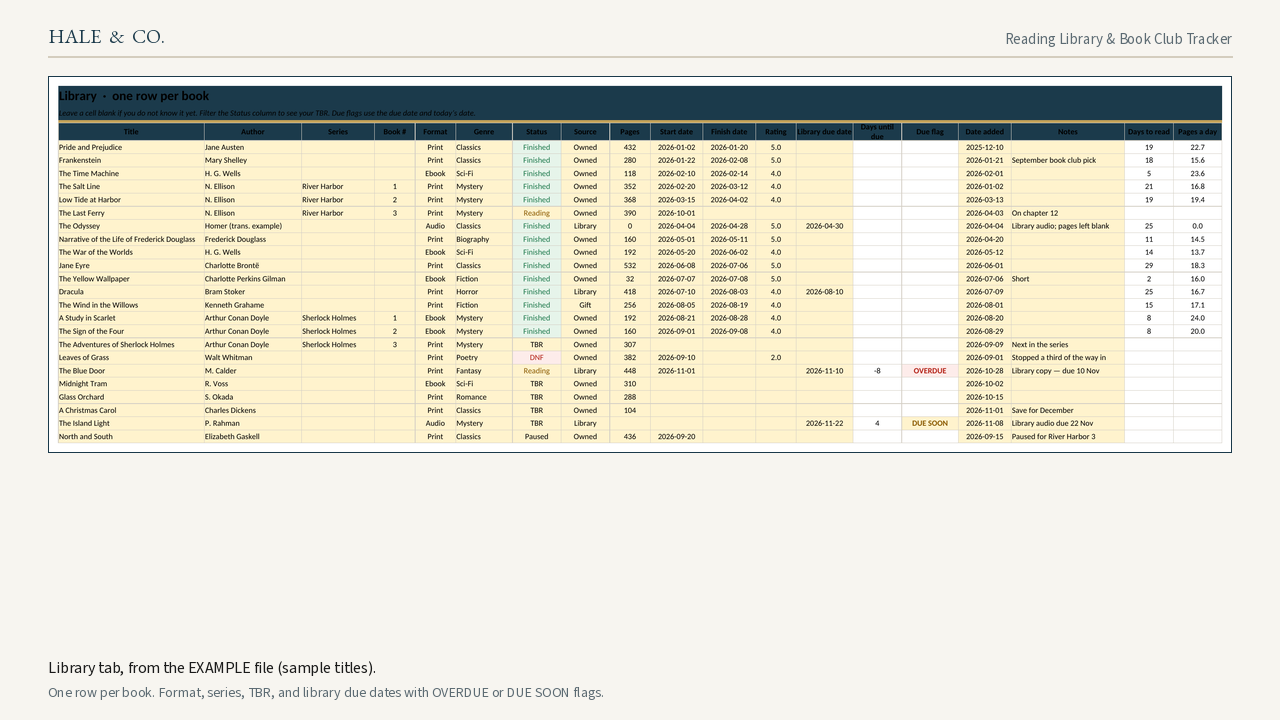
- Log one row per book on Library: title, author, series, format (Print, Ebook, or Audio), genre, status (TBR, Reading, Finished, DNF, or Paused), pages, dates, and rating. Filter Status to see your TBR.
- If the book is a library loan, add the due date. The sheet flags OVERDUE or DUE SOON from today’s date. This does not log in to your library account or pay a fine.
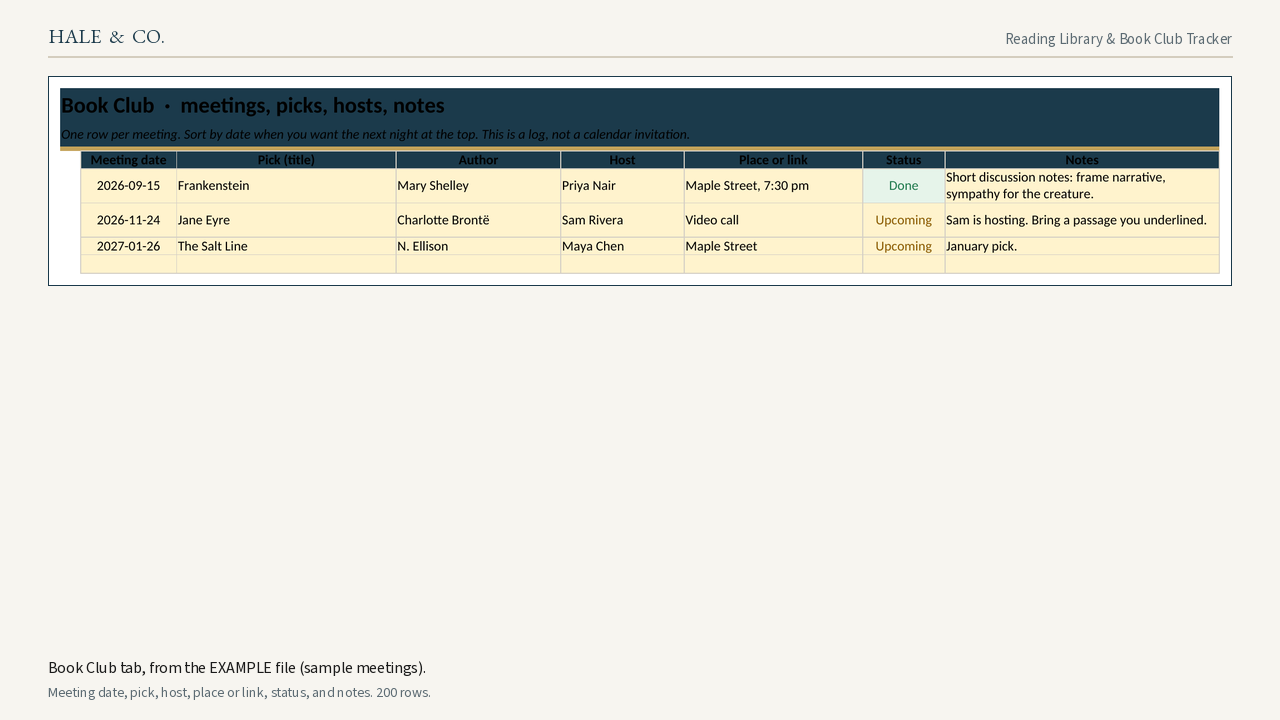
- Type a series name on the Series tab; logged and finished counts come from Library. Use Book Club for meeting date, pick, host, place or link, status, and notes.
- Dashboard totals — books and pages by month, by format, by genre, and by rating — follow the year you set and the finish dates you type.
Optional Goodreads paste
On the Goodreads website, export your library as a CSV (My Books > Import and export). Paste it, including the header row, onto the Goodreads Paste tab. Mapped columns to the right turn exclusive shelves into TBR, Reading, or Finished, and Binding into Print, Ebook, or Audio. A My Rating of 0 is treated as unrated. Check a few rows, then copy the mapped columns and paste values onto Library. You do not have to keep a Goodreads account after you have the file. This workbook is not affiliated with Goodreads or Amazon. Column names can change; if a mapped column is blank, check the header names against the instructions in the file.
What this is not
- This is a reading and meeting log you keep on your computer or in Google Sheets. It is not a Goodreads or Amazon product, not a live library-account connection, and not a calendar that sends invitations.
- It does not replace a 30-tab illustrated journal if that is what you want.
Compared with free alternatives and named templates
A blank Google Sheet, or a simple free log, is enough if you only need title, author, dates, and a yearly goal. This workbook adds library due-date flags, a series tab, a book-club meeting log, and an optional Goodreads paste. It costs $7 (regularly $9; Black Friday price through 1 Dec 2026). Named products we actually opened (prices and review counts from those pages or archives; no invented ratings):
| Product | What we saw | How this workbook differs |
|---|---|---|
| A blank Sheet or a simple free log | Free; often title, author, dates, and a yearly goal | Adds library due flags, a series tab, a book-club meeting log, and an optional Goodreads paste |
| MyProductiveLifeCo “Book Tracker Reading List Spreadsheet” (Etsy) | $5.68, 350 item reviews; Excel requires Office 2021 or 365; Sheets via a PDF currency link (archived Oct 4, 2025) source | Opens in Excel 2016 or later, including without Microsoft 365, and in Google Sheets by File > Import |
| NovellyYours “2026 Reading Log” | $5.99, 48 item reviews, a “2026 Dashboard”; listing said Excel and Sheets are “slightly incompatible”; maker’s site said no refunds once purchased (archived Feb 11, 2026) source | Year is a setting you change; if a file won’t open, email and I’ll fix it or refund you |
| GrowlyLab book tracker (Gumroad) | $10.12, “30 TABS AND 64 CHARTS,” two-step library plus session log source | Six tabs and one Library row per book |
| ShelfLog (Gumroad) | $5 on the opened page, labeled as a “2026 Challenge.” source | Year is not locked to 2026 |
A blank Google Sheet shared on r/DigitalPlanner covers title/author/dates/goal basics. This workbook costs $7 (regularly $9; Black Friday price through 1 Dec 2026) because it also covers library due flags, series, book-club meetings, and optional Goodreads paste.
Works with
Microsoft Excel 2016 and later (Windows or Mac) and Google Sheets. Common functions only, so you are not locked into Microsoft 365. Setup is easier on a computer.
Refunds
Digital download. If a file won't open, email [email protected] and I'll fix it or refund you.
Screenshots
Questions and answers
Does this work in Excel and Google Sheets?
Yes. You get .xlsx files that open in Excel 2016 or later, including without a Microsoft 365 subscription. In Google Sheets, use File > Import, then File > Make a copy so you are not stuck in view-only mode.
How many books can I log?
The Library tab has 1,000 formula rows, and the Goodreads Paste tab has 1,000 as well. Book Club has 200 meeting rows. If you ever need more, copy a blank formula row down, or email me and I will tell you how.
Can I bring in a Goodreads export? Do I need an account?
You can paste a Goodreads library CSV on the Goodreads Paste tab and copy the mapped columns onto Library. You only need access long enough to export the file. This product is not a Goodreads add-on and is not affiliated with Goodreads or Amazon.
Does it track library due dates?
Yes. Add the due date on the Library row. The sheet flags OVERDUE or DUE SOON (the number of days is a setting). It does not connect to a library account.
Is there a book-club tab?
Yes. Book Club is a meeting log: date, pick, host, place or link, status, and notes. It is a log, not a calendar invitation.
Is the year locked to 2026?
No. You set the year on Start Here. Dashboard totals follow that year and the finish dates you type.
Can I use it on a phone?
Setup is easier on a computer. We have not verified the Google Sheets or Excel mobile apps, so we do not claim you can log books from a phone.
What if the file won't open?
Email [email protected]. I will help you get it open in Excel or Google Sheets, or refund you.
Answers restate the sourced facts above.
Other Hale & Co products (our own products)
Our own product · $11 one-time (regularly $14)
Small Landlord Rent & Expense Tracker
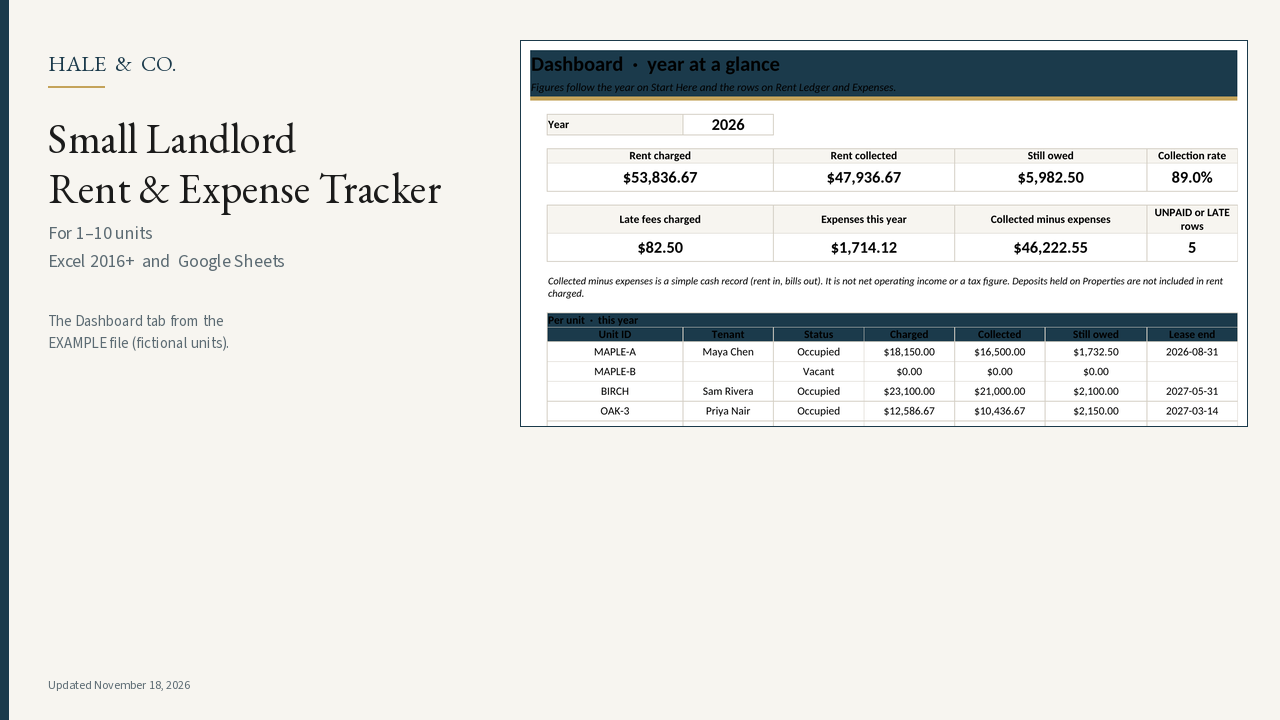
A $11 recordkeeping workbook (regularly $14; Black Friday price through 1 Dec 2026) for landlords with 1–10 units. Log rent and bills in one ledger, see who is late, and open a per-tenant year view — in Excel 2016+ or Google Sheets.
Black Friday price through 1 Dec 2026